Built by an ISP · Running our own FTTH network

Network management
built for FTTH ISPs.

ST-NMS monitors your OLTs, ONUs, switches, routers, BNGs and firewalls, maps your fibre plant, and sends the right alarm to the right engineer’s phone — all from one console, on the web and on your team’s phones.

🔌
📡
🛡
🔔
OLT / ONU • Switches • Routers • BNG • Firewalls • Fibre Plant • Alarms
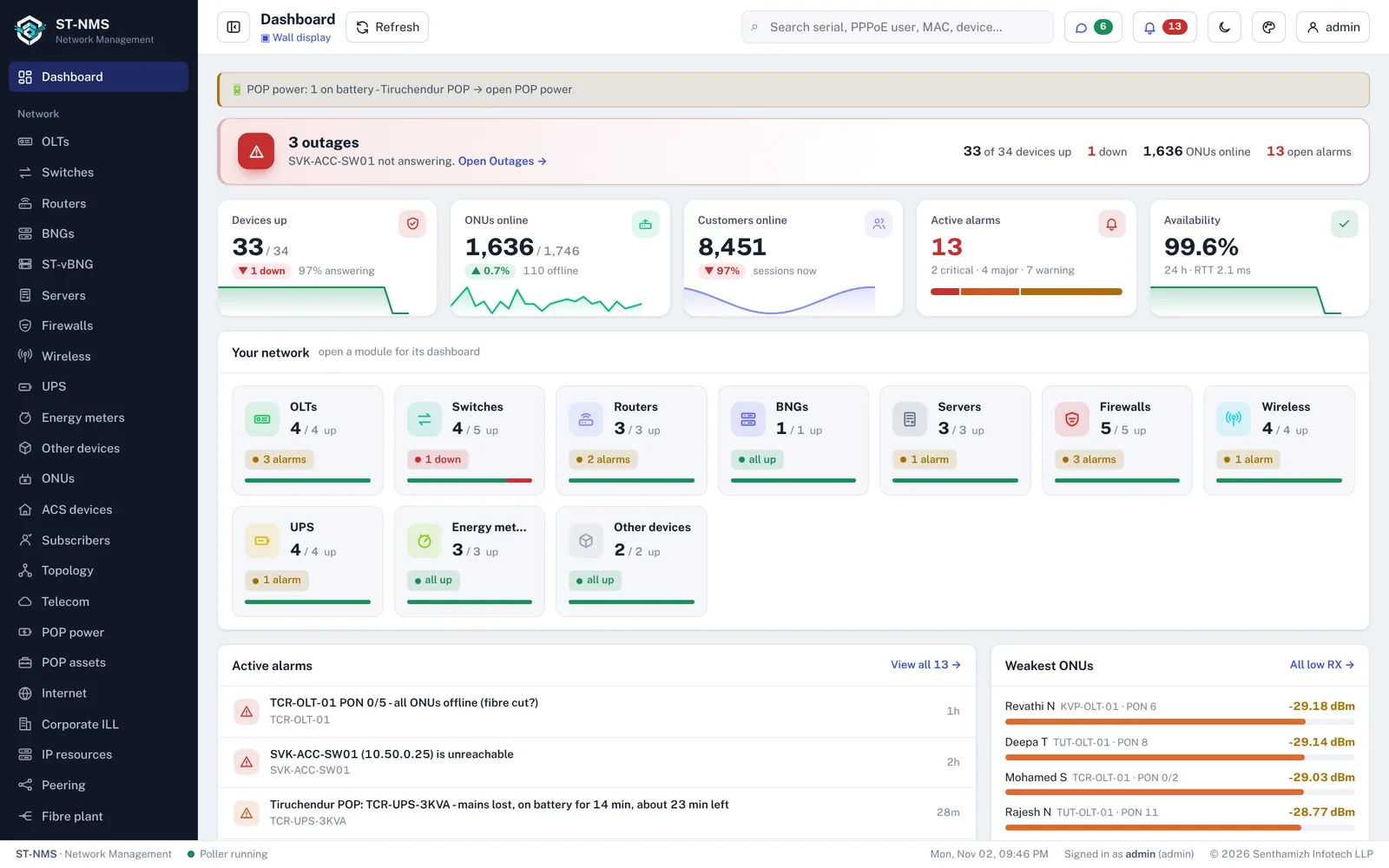
ST-NMS NOC dashboard showing device counts, alarms and live traffic
Built by an ISP, running on our own FTTH network. Grey Sky Networks · AS151719 · Tamil Nadu, India
Ready for VSOL · C-Data · Stelfiber OLTs · MikroTik · Cisco · Juniper · Huawei · Fortinet · Palo Alto · and any SNMP device
Why ST-NMS

The problems it solves.

Everything an FTTH ISP needs to see, fix and dispatch — in one place.

📞
Customer calls “no internet”
Search a PPPoE user, serial or MAC and see the line instantly: light, status history and a plain verdict — weak light, LOS, power cut or a PON-wide outage.
PPPoE / Serial / MACPlain verdictStatus history
🌑
A PON goes down at night
Alarms go out within the poll — by push, Telegram, e-mail, SMS or WhatsApp — to the site’s team only, before the calls start.
Instant alarmsSite teamsRoot cause
🛠
Field team works blind
A plant map with boxes, splitter ports, fibre colours and cores; jobs with photos and a completion report — on the phone.
Plant mapJobs on phoneLight meter
🧰
Tools everywhere
One console and one app for SNMP graphs, OLT control, ACS, stock and jobs — with a role per module.
One consoleOne appRoles per module
The whole ISP, one product

Twelve modules, one console.

Network, fibre plant, field jobs, stock and more — not just SNMP graphs.

🔌
OLTs & PON ports
Every OLT and PON at a glance — status, ONUs online, light levels and traffic, with the OLT’s front panel drawn live.
GPON / EPONPON healthFront panel
📶
ONUs & customers
Every customer’s fibre in plain language: RX/TX light, history and a verdict, found by PPPoE user, serial, MAC or name.
ONU lightFlappingDegrading
🖥
Switches, routers & servers
Ports, traffic, errors, MAC and LLDP; router interfaces, BGP peers and health; Linux/Windows servers.
SNMPRouterOSBGP
🛡
Firewalls
Sessions, HA state, VPN tunnels and subscriptions across nine firewall vendors over SNMP.
FortinetPalo Alto9 vendors
🚨
Alarms & outages
Know what broke, where, and how many customers it hit — root-cause only, with the cause (power cut or fibre fault).
Root causeOutage listMaintenance
🔔
Notifications
The right alarm to the right person — push, e-mail, Telegram, SMS (DLT), WhatsApp and webhooks, with quiet hours.
PushTelegramWhatsApp
🗺
Fibre plant & map
Your fibre network on a map down to the core — splitters, cores, colours and a new-connection planner.
Plant mapCores & coloursPlanner
🔨
Field jobs, staff & shifts
Dispatch, track and close a job from the phone — with a live light meter at the customer’s door.
DispatchLight meterShifts
📦
Operations & assets
Stock, IP resources (IPAM), telecom circuits, corporate ILL links, POP power and ping monitoring.
StockIPAMPOP power
📊
Reports, backups & tools
Optical health, flapping, availability and capacity reports; daily config backups; ping, traceroute and discovery.
ReportsConfig backupTools
📡
ACS (TR-069)
Sync every ONT/router from the ACS — reboot, Wi-Fi settings, diagnostics, firmware and zero-touch provisioning.
TR-069Zero-touchWi-Fi
👤
Users, roles & audit
Roles as a tree over every module, device-level limits, two-factor sign-in and a full audit log.
RBAC2FAAudit log
A look inside

See ST-NMS in action.

01 · OLT & ONU

Every customer’s fibre, in plain language.

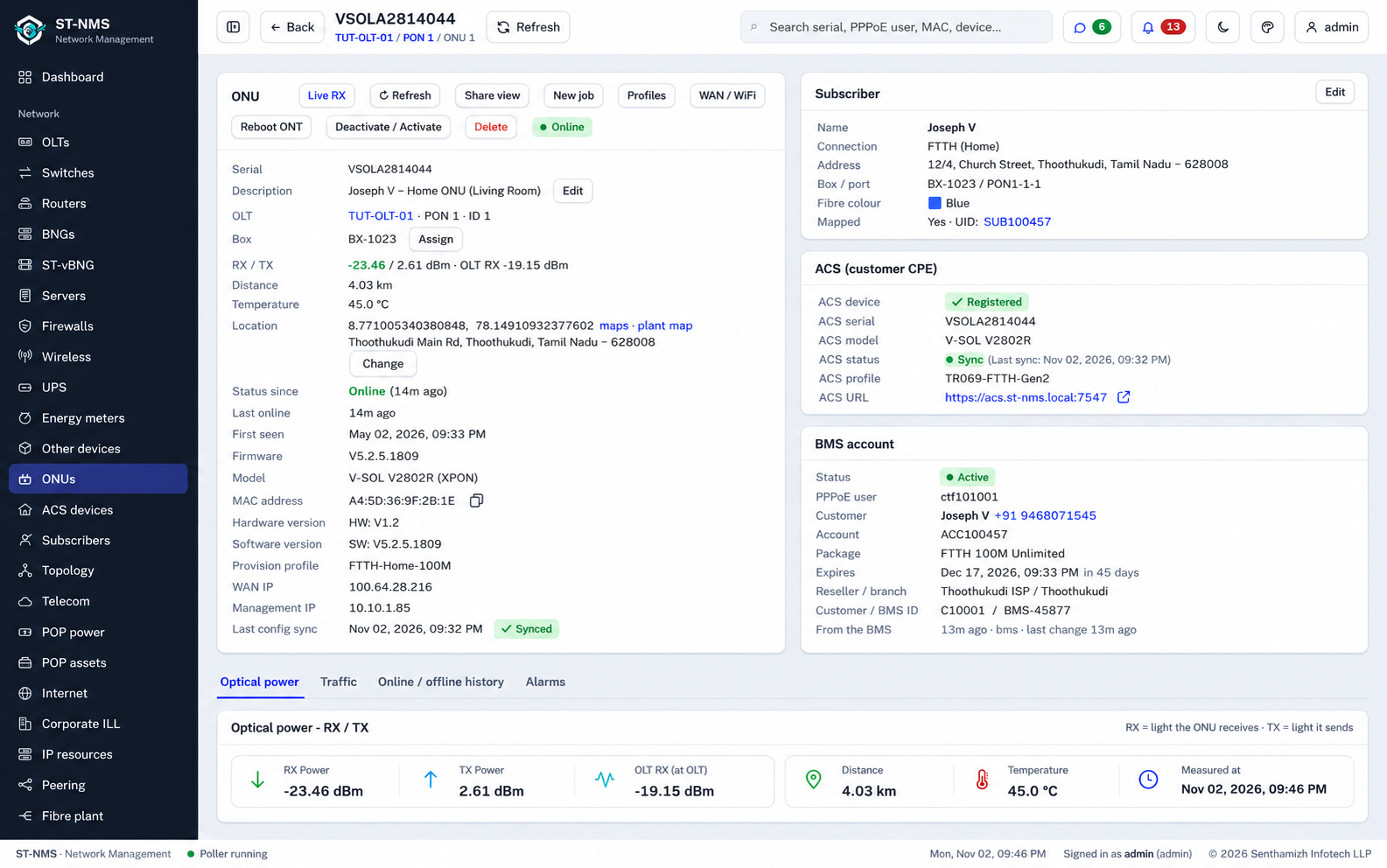
Find a line by PPPoE user, serial, MAC or name and see its RX/TX light, the OLT-side reading, distance and model — with the full status history and the OLT’s own reason for each drop.

  • RX / TX light, temperature, voltage and distance per ONU
  • Status history with LOS, dying gasp and deregister reasons
  • Flapping and degrading alarms before the customer notices
  • Light map and reports of weak, low and overloaded ONUs
Book a demo →
ONU page showing RX light history and status changes
02 · Fibre plant & field

Your fibre network on a map, down to the core.

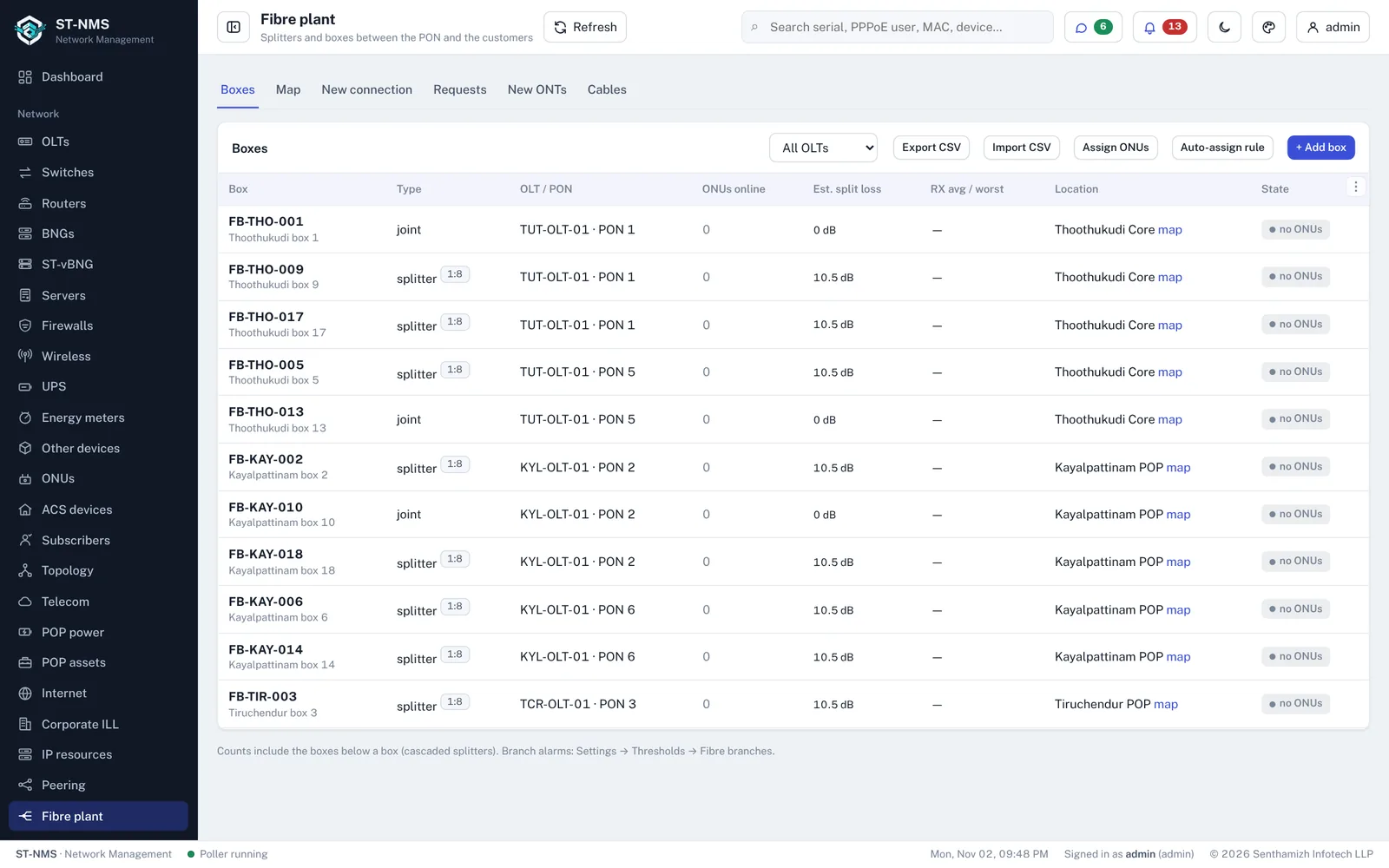
Splitters, FDBs and joints with location, ratio and cascading; multi-core cables with each core’s colour and use; and a new-connection planner that shows free splitter ports near a customer and the light they can expect.

  • Boxes, splitter ports, fibre colours (TIA-598) and cores
  • Dispatch field jobs from an ONU, outage, map box or billing
  • Engineer moves the job en route → on site → resolved, with photos
  • Live light meter at the customer’s door
Book a demo →
Fibre plant with splitter boxes, cores and fibre colours
03 · Alarms & outages

Know what broke, where, and how many customers it hit.

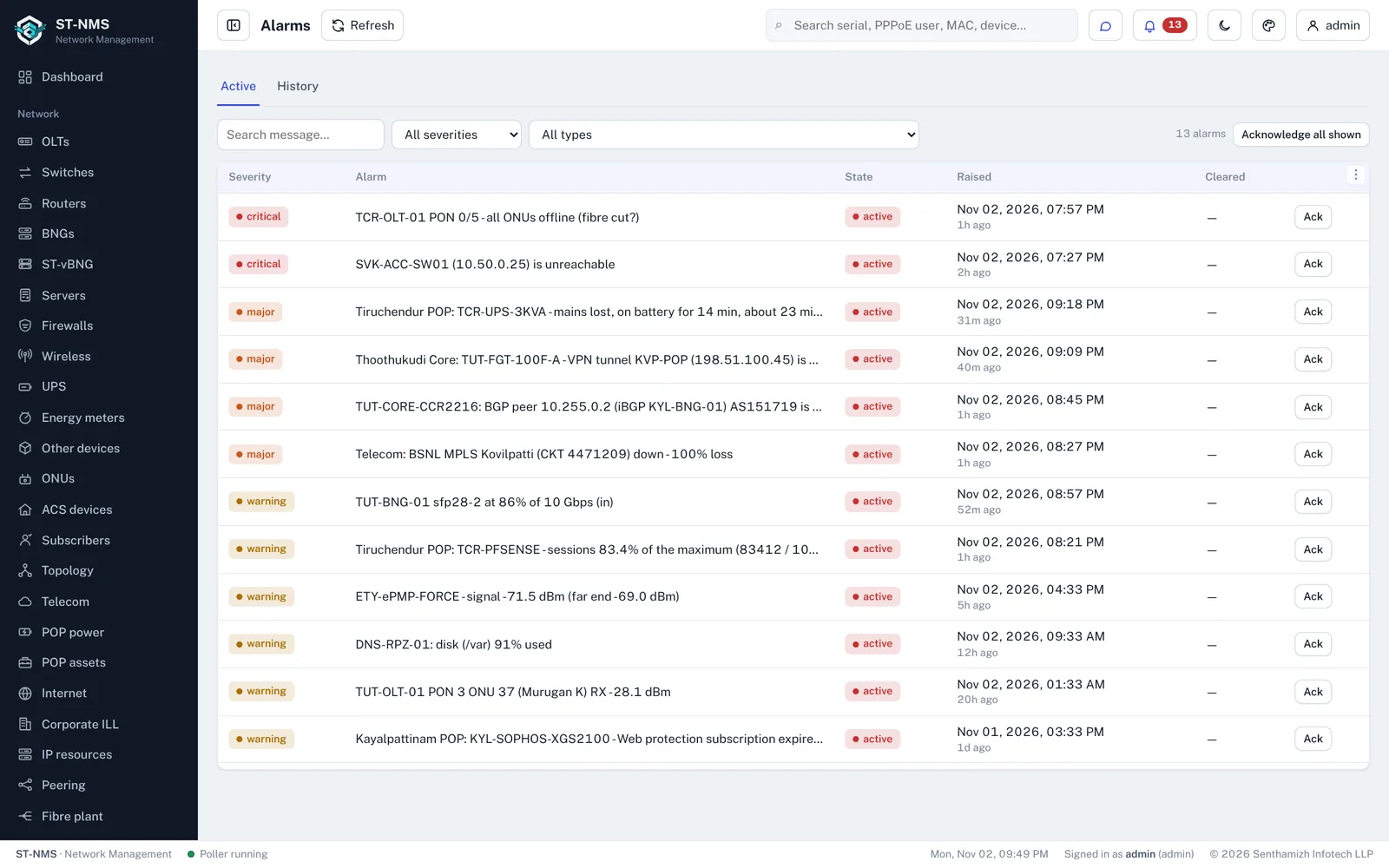
Device down, PON down, mass ONU drop, weak light, BGP down, UPS on battery and more — with root-cause grouping so a device behind a down uplink is part of that outage, not a second alarm.

  • Root-cause only — no alarm storms
  • Cause shown: power cut (dying gasp) or fibre fault (LOS)
  • Outages page with affected customers and a downloadable list
  • Planned maintenance windows hold back alarms
Book a demo →
Alarms page showing active alarms grouped by root cause
04 · Mobile app

Your network and your field team, in every engineer’s pocket.

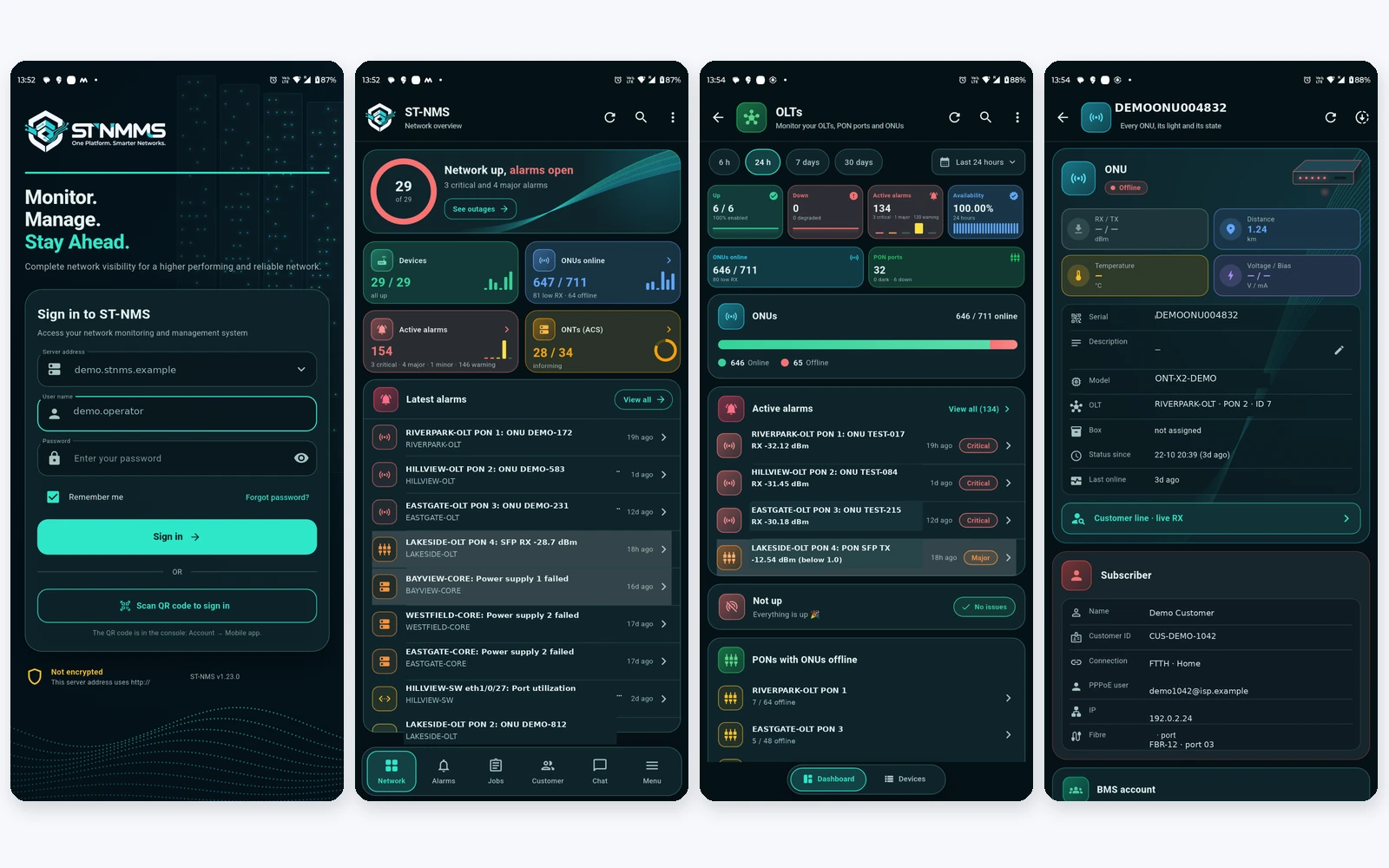
The Android app signs in to your own ST-NMS server. Alarms arrive as push notifications even when the app is closed, and field engineers carry the customer’s line and their jobs with them.

  • Push alarms with separate sounds by severity, and quiet hours
  • The customer’s line by PPPoE user, serial, MAC or name
  • My jobs, status from the phone, photos and completion report
  • Fibre plant, staff chat and the live light meter
Book a demo →
ST-NMS mobile app console page
05 · Software BNG

Your own BNG, in the same console.

ST-vBNG is a software BNG (BRAS) on a standard server — PPPoE and IPoE subscribers, RADIUS, NAT and CGNAT, firewall, VLANs, DHCP and connection logs. It runs on its own, or ST-NMS manages every BNG from one place.

  • Sessions across every BNG, with 90 days of history
  • Safe apply: a change rolls back by itself unless an admin keeps it
  • Disconnect a session; ping, traceroute and torch on the BNG
  • Speed tiers from 1G to unlimited
Explore ST-vBNG →
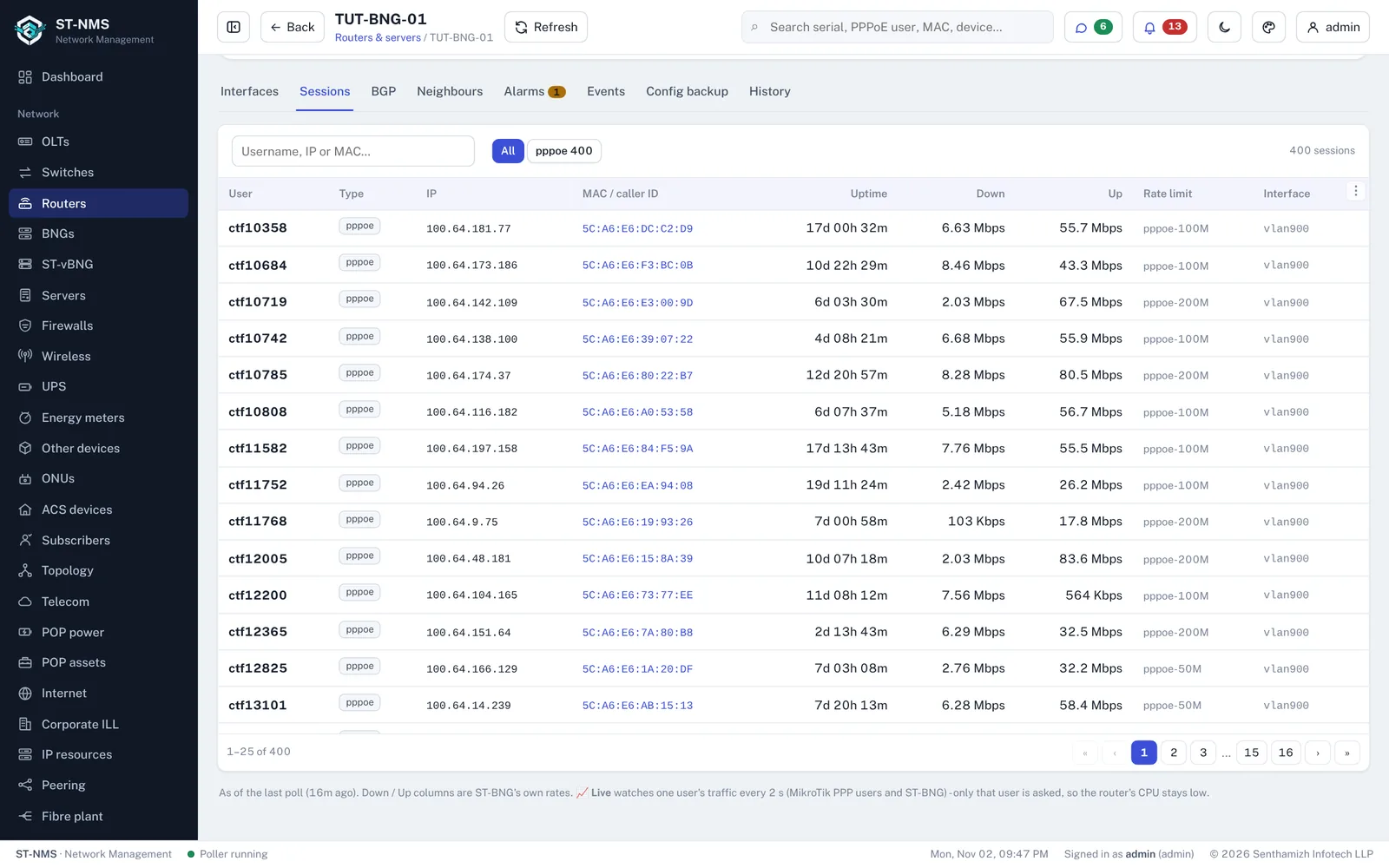
ST-vBNG live subscriber sessions across BNGs
Live subscriber sessions across every BNG, managed from ST-NMS.
Editions

Standalone or cloud.

Run it on your own server, or let us host it — one company per ISP. Pricing is on enquiry.

Standalone
On your own server (or a VPS)
Request pricingone-time licence + AMC
FOR FULL DATA CONTROL
  • ✓ Your network data stays on your server
  • ✓ Managed ST-vBNG included (by tier)
  • ✓ White-label option (logo, name, footer)
  • ✓ 15-day free trial, every module
Request Pricing →
Cloud
Hosted, one company per ISP
Request pricinghosted subscription
BEST FOR SMALLER ISPs
  • ✓ Nothing to install or maintain
  • ✓ Each company sees only its own data
  • ✓ Monitoring of BNGs (management is standalone-only)
  • ✓ 15-day free trial, every module
Request Pricing →

Licence = core + add-on modules + limits. Annual maintenance (AMC) is offered with the licence. Prices shared on enquiry.

Security & data protection

Your network data stays yours.

🔒 Role-based access: every module with List, View, Add, Edit, Delete and special actions.
🏗 Limit people to some devices or to their site’s team.
🔑 Two-factor sign-in, allowed-IP sign-in, optional one session per user, lockout on failed attempts.
🔐 Device passwords, CLI logins and BNG keys stored encrypted.
📝 Every change recorded in the audit log, with who did it.
✅ Device writes (OLT reboot, PON off, ONU binding) are admin-only and ask for confirmation.
🌐 Cloud edition: each company’s rows kept apart in the database (row-level security).
📶 Offline licence check — no phone-home needed to keep working.
FAQ

Network management, answered.

Which OLTs does ST-NMS support?

VSOL GPON and EPON (V1600 series) and Stelfiber / C-Data GPON and EPON have ready profiles. Other OLTs can be added as a profile — send us the model and we will check it.

Do I need to change anything on my network?

No. ST-NMS reads your existing devices over SNMP (and the OLT’s CLI where needed) — just allow the ST-NMS server to reach them, and point traps and syslog at it if you want events.

Can I run it on my own server?

Yes — the standalone edition installs on your own server, and a cloud edition is also available.

Is there a mobile app?

Yes, for Android: alarms with push notifications, the customer’s line, field jobs, the fibre plant and chat. It signs in to your own server.

Does it replace my billing system?

No. It works alongside your billing system (BMS / ISPRadius or any CRM) and can show a customer’s line inside your billing screen.

How are alarms sent?

Push to the app, Telegram, e-mail, SMS (DLT), WhatsApp or webhooks — per alarm type, per site team, with quiet hours.

What is ST-vBNG?

Our software BNG for PPPoE / IPoE subscribers. ST-NMS can monitor it or manage it fully, and its licence can be included in the ST-NMS licence.

Can I try it first?

Yes — every installation starts with a 15-day trial with every module, and no device limit.

One Platform

Also from ISPRadius.

ISP Management Software → ISP Billing Software → ST-vBNG (Software BNG) → Complete OSS/BSS Platform →
Request a Demo / Pricing

Ready to simplify your ISP operations?

Share your requirement — users, NAS count, WiFi/Hotel, TR-069, monitoring — and we’ll recommend the best plan.

Demo + Setup Guidance
Plan + Add-on Recommendation
Integration Support
Faster Deployment

Book a Demo

Fill in your details and we'll be in touch shortly.